Developing a VR system for children to prototype interactive objects
February 2021
Overview
Smart Codesign VR is a prototype platform for building and testing interactive “smart objects” in virtual reality. Players choose three cards, one each for environment, input and output, then use physical movements to define when an object responds and what it does. They can place the completed virtual object in a park and test its behavior.
The project builds on SNaP (The Smart Nature Protagonists), a board game developed by i3Lab at Politecnico di Milano. In SNaP, children combine cards to invent smart objects and describe them in a sentence on paper. This project aimed to turn those descriptions into virtual objects that children could assemble and interact with through their own movements.
Our four-person team designed and implemented the system for the final project in Advanced User Interfaces at Politecnico di Milano in the 2020–21 academic year. We designed it for children aged 11–13, with particular attention to children with neurodevelopmental disorders (NDD). Built in Unity and C# for Oculus Quest 2, the prototype supports the complete sequence from card selection to interaction in the virtual park.
SNaP and the design context
A game that puts children in the designer’s role
In SNaP, two to four children act as “designers,” while an adult facilitator plays the “mayor.” The mayor introduces a mission, and the children discuss ideas and combine cards to design a smart object that addresses it. The game aims to develop creativity, collaboration and the ability to express ideas. Use by children with neurodevelopmental disorders was also considered, but this project did not evaluate therapeutic or educational effects.
Three card types: environment, input and output
SNaP has three kinds of card, each with a different role.
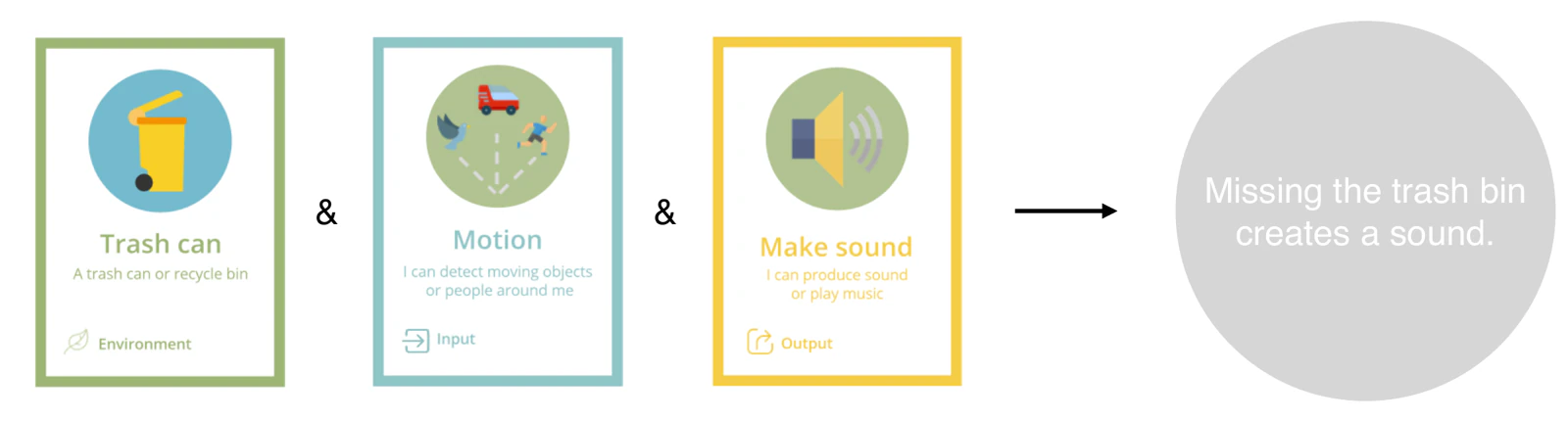
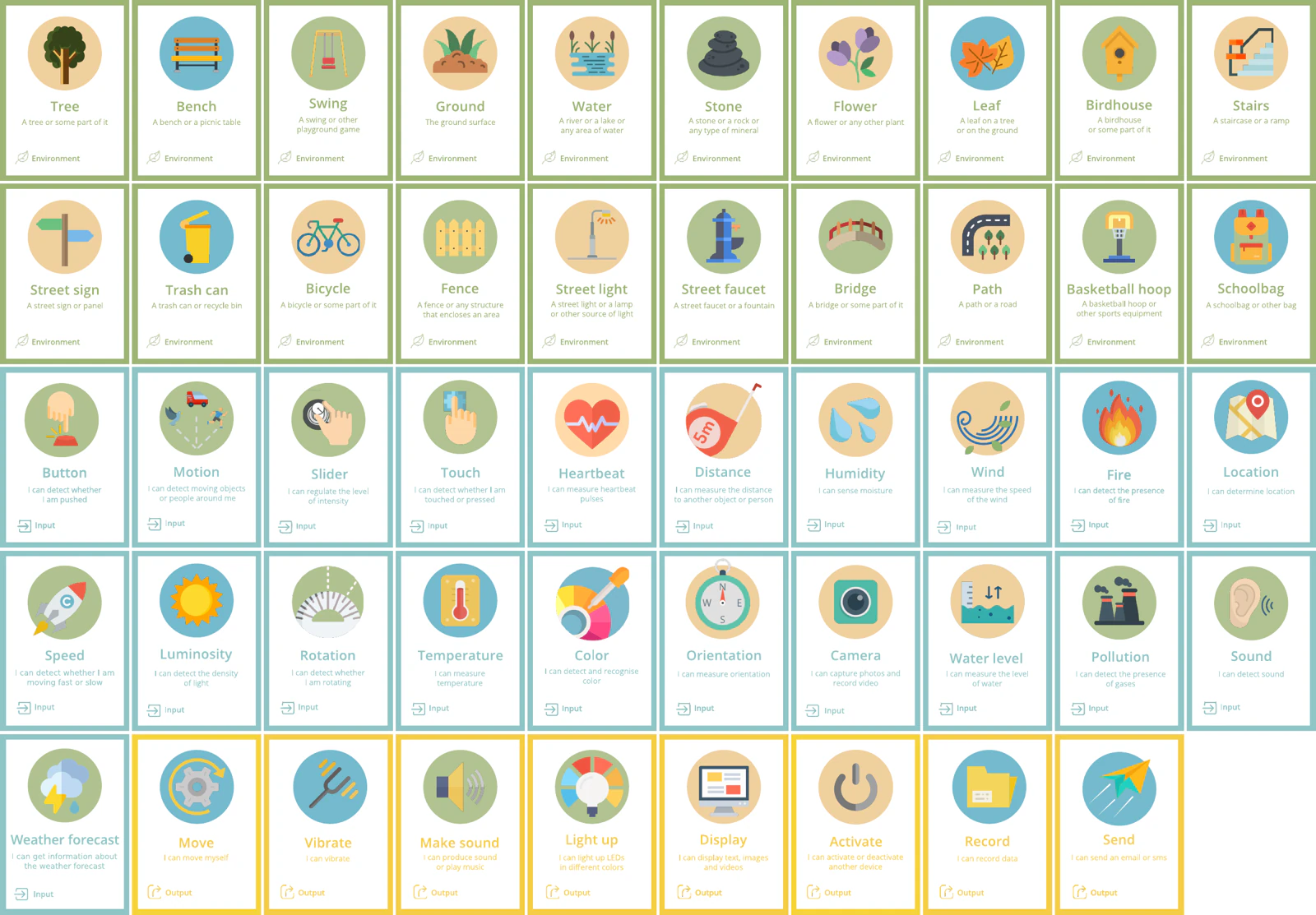
Environment cards represent the object to be made smart: a tree, bench, swing, body of water, stone, streetlamp, bin, bicycle, bridge, stairs or school bag. These are familiar objects and features of parks and streets. The environment card identifies the object that will contain the input and output functions.
Input cards define what the object detects or responds to, such as a button, motion, touch, distance, temperature, humidity, brightness, color, sound, fire, water level or a weather forecast. They represent the smart object’s inputs, analogous to sensors.
Output cards define the object’s response: lighting up, making a sound, vibrating, moving, displaying, recording or sending information. They represent its output functions, analogous to actuators.
The environment card gives an input–output pair its context. With motion as the input and sound as the output, a bin could make a sound when someone misses it, while a streetlamp could announce someone approaching. The input and output specify how a device behaves; adding the environment connects that behavior to a situation in everyday life.
Turning written ideas into interactive virtual objects
At the time of this project, a SNaP session ended with a written description of the smart object the children had designed. In parallel, i3Lab was developing a “physical board” that combined a tablet with Arduino to turn these descriptions into physical prototypes. Smart Codesign VR explored another approach using virtual reality, a medium the research team had not yet investigated for this purpose.
VR offered two opportunities. First, children could prototype through full-body movement: grasping, carrying, shining a light and painting with a brush became ways to set conditions and define behaviors. Second, their ideas could take visible form as virtual objects they could interact with immediately. A written description could become an object with a size and shape in front of them.
Intended users
The intended users were children aged 11–13, with particular attention to children with neurodevelopmental disorders. Designing a smart object requires some logical reasoning, so both SNaP and the VR version were designed for children in this age range.
The project aimed to help children express their ideas through hands-on prototyping and interaction. These were design goals, not demonstrated therapeutic or educational outcomes; the prototype was not evaluated with children.
Designing a comfortable space
Drawing on the materials consulted for the project, we used four areas to guide the spatial design: sound, light and color, spatial organization, and materials. For sound, we considered noise isolation, adjustable volume, and quiet, consistent audio to accommodate auditory sensitivities. For light and color, we considered a calm, low-saturation background with bright, saturated colors confined to small areas. Clear spatial boundaries, an orderly layout, simple and readable forms, and unobstructed movement were also design considerations. A virtual environment lets designers control these aspects. This project did not evaluate their effects on users’ comfort.
Constraints and risks of VR
The project also considered the constraints and risks of VR: hardware cost, motion sickness, head and neck strain from the headset’s weight, accidents when the headset obscures the physical surroundings, eye strain during prolonged use, and concerns about dependency associated with excessive immersion.
These considerations informed three design decisions: keep interactions simple while providing enough challenge to support learning; make visuals and audio clear without excessive stimulation; and give the experience a definite endpoint. Once prototyping and testing in the park are complete, the activity ends, rather than encouraging users to remain in VR indefinitely.
The prototype: experience and implementation
Four stages of the experience
The application has four stages: a standby screen, card selection, prototyping and interaction in the virtual park.
1. Standby screen
The application opens on a title screen and waits for a controller button press before continuing. This deliberate pause gives the player time to put on the headset and get into position before the main experience begins.
2. Card selection: grasp and place
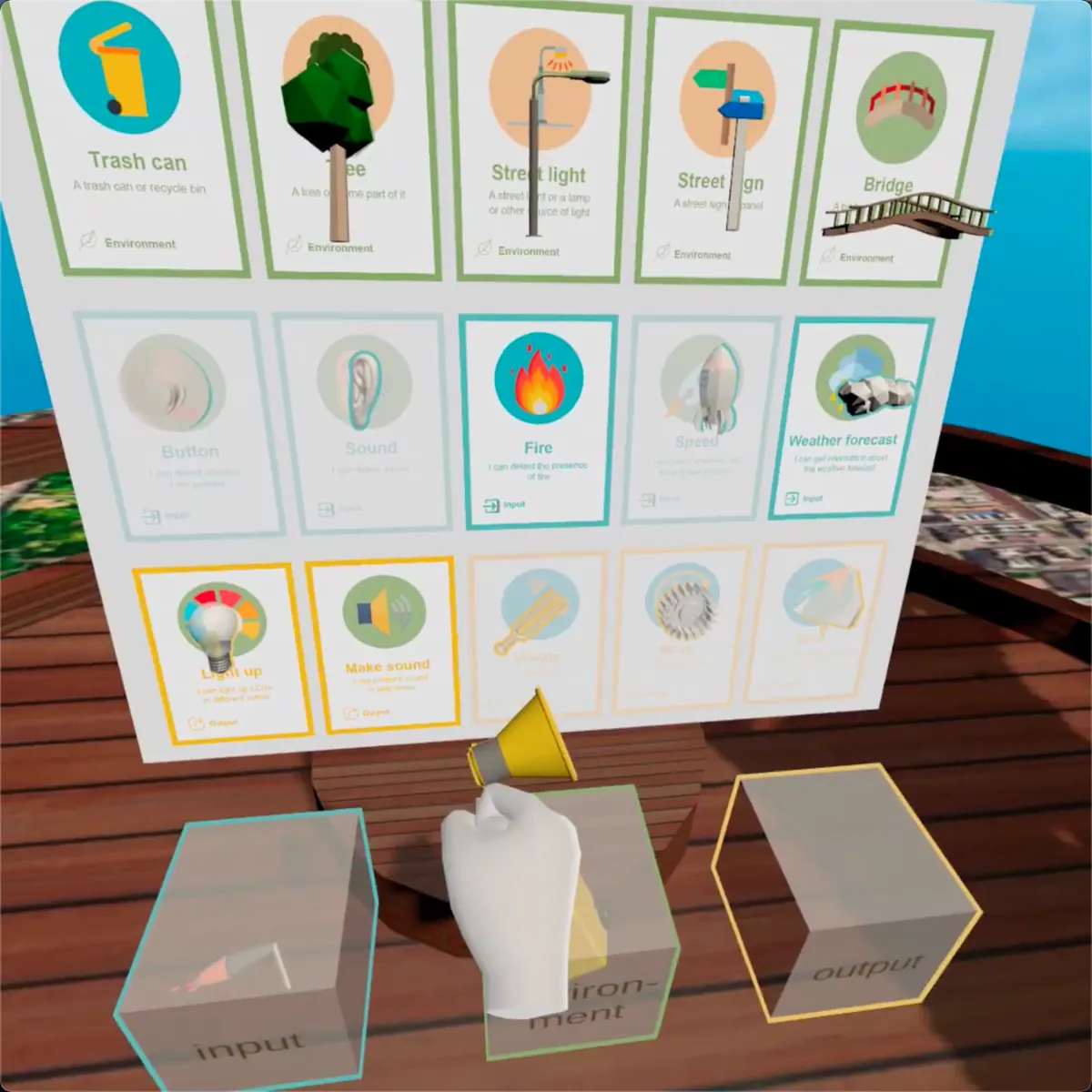
The player selects one environment card, one input card and one output card by grasping each card’s corresponding object and placing it in the matching box. This grasp-and-place interaction makes use of VR’s three-dimensional space. Once all three boxes are filled, an audio prompt guides the player to the prototyping stage. Cards can be selected in any order, but all three are required to continue.
3. Prototyping: defining conditions and behaviors through movement
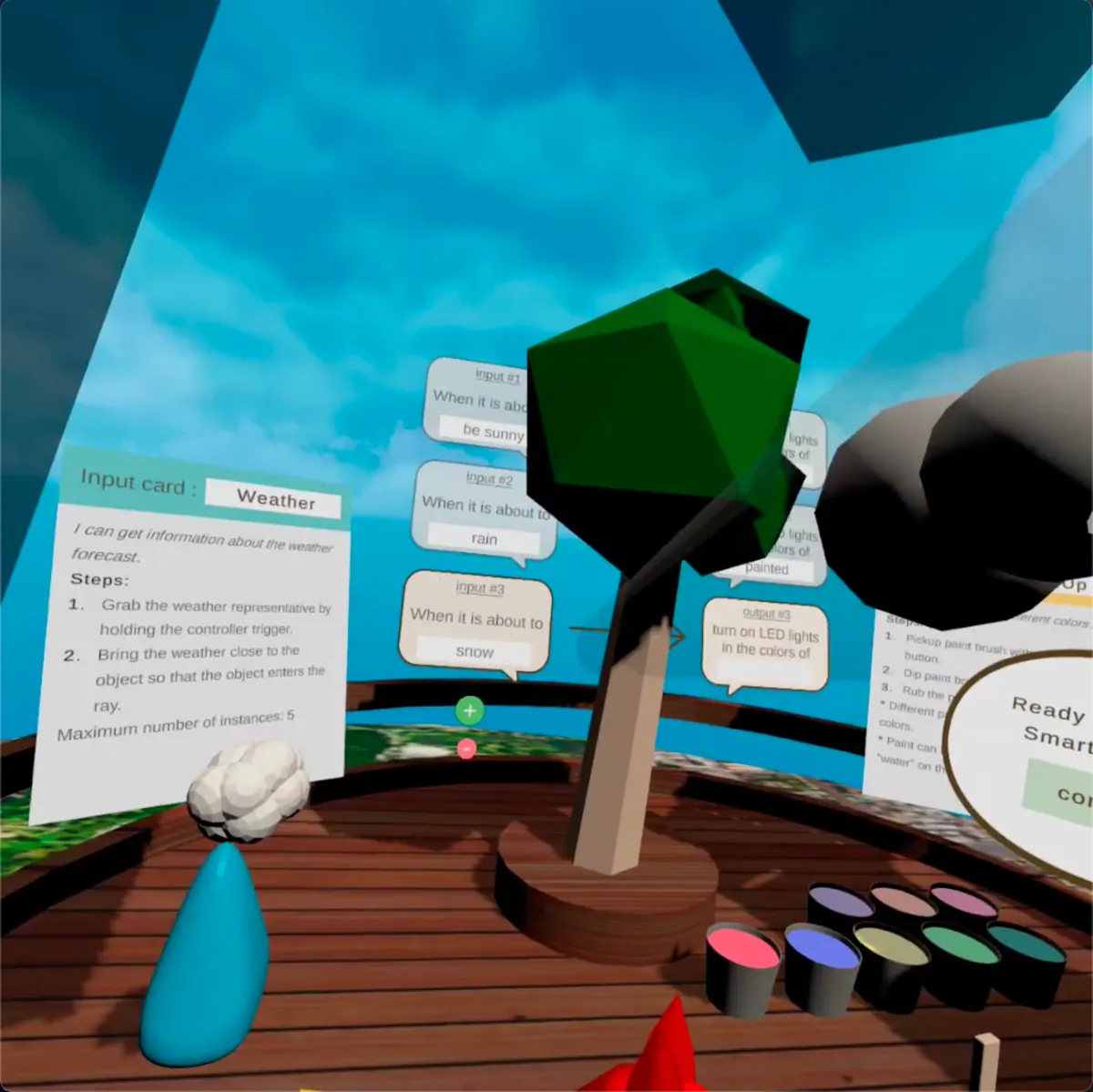
Prototyping is the core of the system. Players define the trigger condition for the selected input card and the response for the selected output card. Each card has its own interaction, using movements that require six-degree-of-freedom tracking.
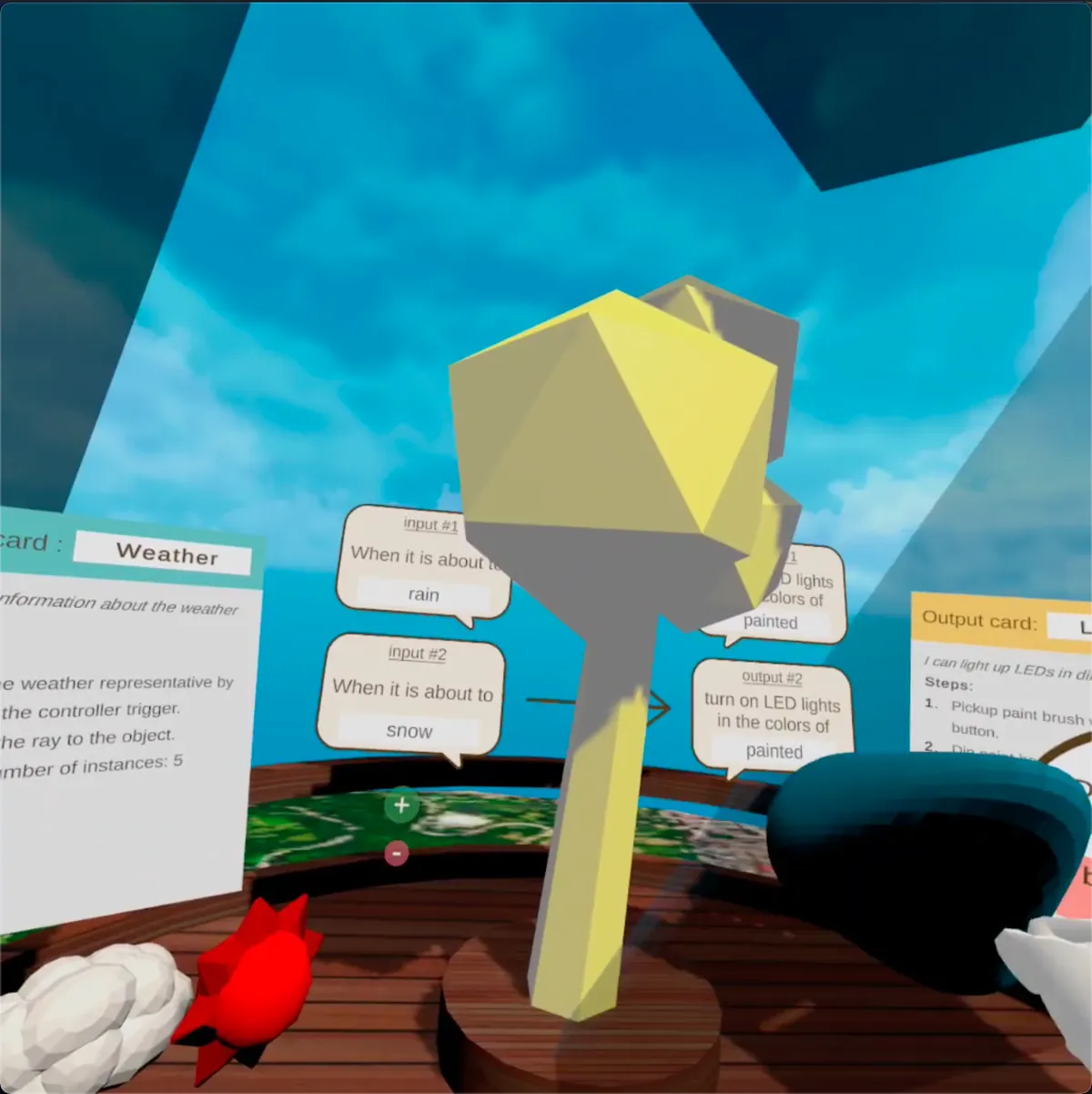
For example, selecting “weather forecast” displays objects representing sun, clouds, rain, thunder and snow within reach. The player grasps one and points its ray at the target object to set the condition. With “light up” selected as the output, the player picks up a brush, dips it into a paint can and paints the target object to choose its glow color. To erase an applied color, the player dips the brush into the “water” can and brushes over the object again.
A key implementation decision was to support multiple input–output pairs for a single object. The original plan allowed only one rule, such as “glow red when sunny.” Supporting multiple pairs allowed the object to respond differently to different conditions: red in sunshine, blue in rain and white in snow. Players can test each pair before confirming it and return to edit it if needed.
4. The park: testing the object
After confirming the object, the player enters a virtual park, places the object, triggers the defined input condition and observes its response. A celebration marks the object’s successful operation and ends the experience.
Overall flow
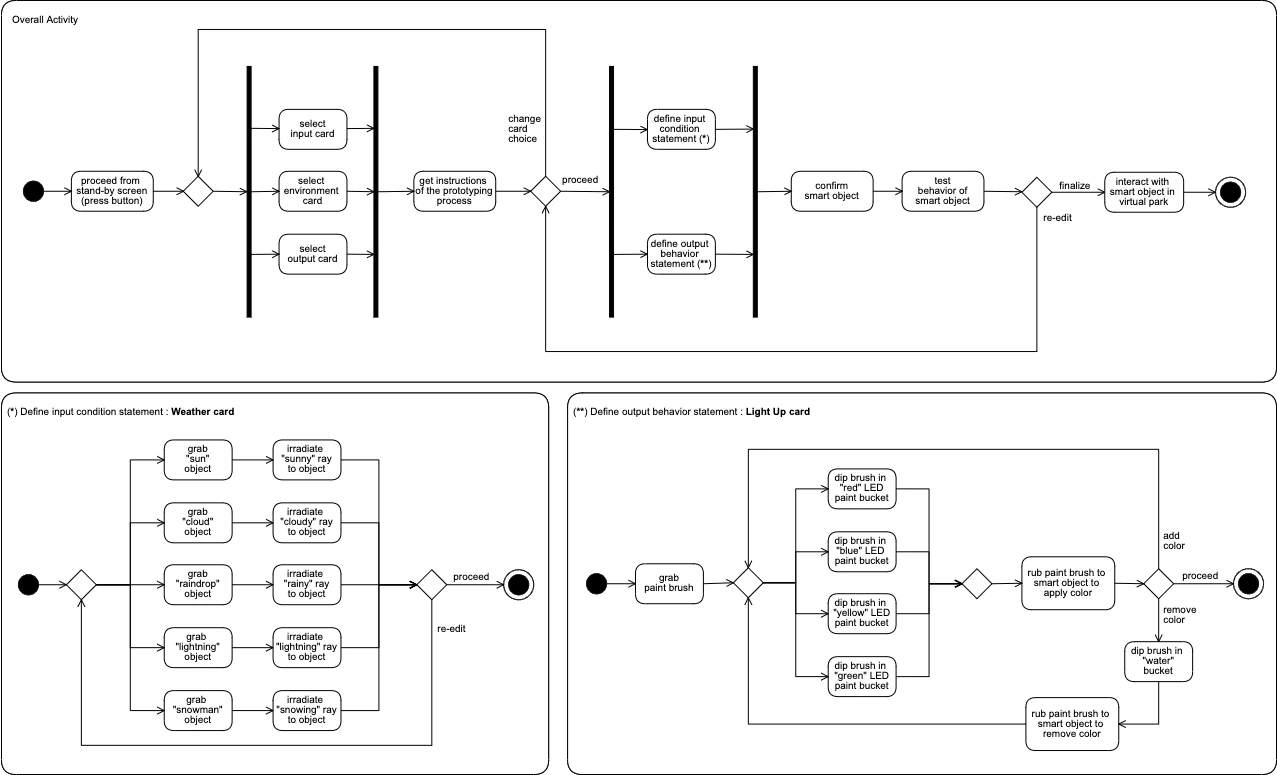
The UML activity diagrams below summarize the experience. The upper diagram shows the overall flow; the two below detail the “weather forecast” and “light up” interactions. Branches show how players can return to card selection after receiving instructions and return to editing after confirming and testing their object.
Hardware and tools
The prototype was built for Oculus Quest 2. Its six-degree-of-freedom tracking supports turning, moving and manipulating virtual objects. Because repeated hands-on interaction was central to the experience, the team ruled out phone-based headsets limited to three-degree-of-freedom tracking.
The application was developed in Unity and C#. The Oculus Integration package connected it to Quest 2 and provided APIs for VR camera behavior, rendering and controller input.
Four scenes and 13 classes
The system uses four Unity scenes, one for each stage of the experience. It contains 13 classes, including three abstract classes.
The title scene contains a single class, TitleSceneCore, which advances to the next scene when the player presses a button.
The card-selection scene uses CardSelectionSceneCore and CardSelectionDetector. CardSelectionSceneCore creates three detector instances, one for each environment, input and output box. Each box draws in a nearby card object and marks its category as selected. Once all three selections are complete, the scene writes them to the static SmartObject class and advances. SmartObject retains this data between scene changes, connecting the four scenes into a continuous experience.
In the prototyping scene, PrototypingSceneCore coordinates the workflow. Card behavior is represented by an inheritance hierarchy: Card is the base class, InputCard and OutputCard derive from it, and concrete classes such as Weather, Fire, MakeSound and LightUp implement the individual interactions. Card, InputCard and OutputCard are abstract because only the concrete subclasses perform prototyping operations.
PrototypingSceneCore maintains one list of input-condition instances and another of output-behavior instances. If the selected cards are “weather forecast” and “light up,” the lists contain Weather and LightUp instances, respectively. One instance of each is created at the start; pressing the add button creates another pair. Each frame, the system evaluates the input conditions and invokes the corresponding output behaviors. When the user confirms the object, isConfirmed is set to true and the assembled behavior data is written to SmartObject’s static properties.
The interaction scene contains a single class, InteractionSceneCore. It handles object placement in the park, testing the defined conditions and responses, and the final celebration.
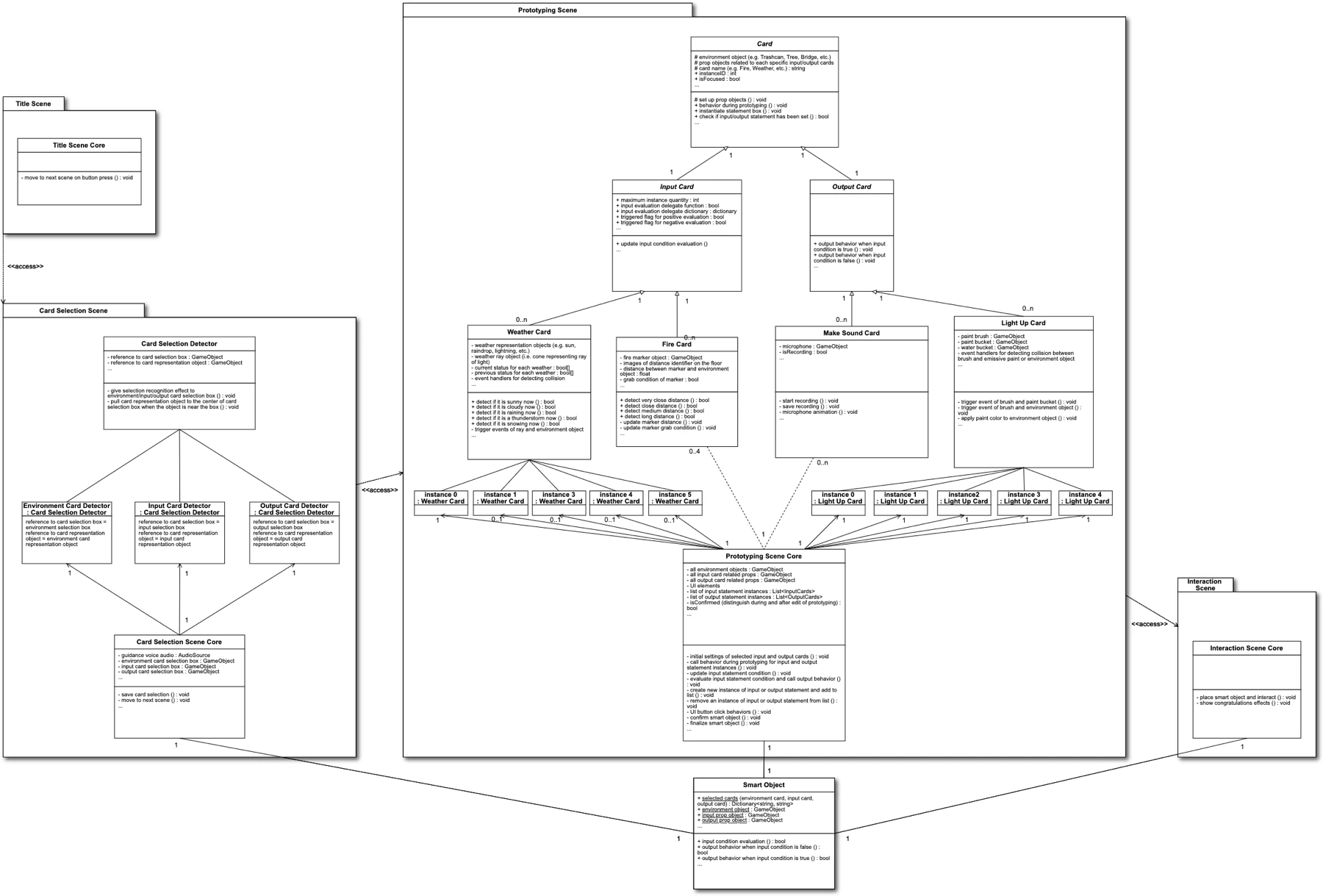
Smart Object” at the bottom center retains data between scenes. Attributes and methods are simplified for readability.Source code:
github.com/takafumihoriuchi/SmartCodesignVR — Assets/myScripts
Results and remaining work
Nine of 49 cards implemented
The prototype implements nine cards. Its core functionality is working: card selection, definition of conditions and behaviors, management of multiple instances, and transfer of data between scenes. This provides a foundation for adding more cards, although that implementation work remains. Six additional cards were designed but not implemented; the other 34 still require interaction design as well as implementation.
| Status | Cards |
|---|---|
| Implemented (9) | Environment: tree, streetlamp, road sign, bin, bridge Input: fire, weather forecast Output: make sound, light up |
| Designed only (6) | Input: button, speed, sound Output: move, vibrate, send |
| Not started (34) | 15 environment cards, 16 input cards, 3 output cards (display, activate, record) |
User evaluation was not conducted
The prototype was not evaluated with users. Development coincided with remote participation during the COVID-19 pandemic. Neither an in-person workshop with VR headsets nor a remote alternative could be arranged. The project demonstrates that the designed experience can be implemented as a working prototype. Its usability for children and its value in a therapeutic setting remain untested.
A future evaluation would ask how intuitive the interface is for prototyping. Possible measures include completion time, how closely the final smart object matches the participant’s initial idea, and the number of unintended button presses. A post-session questionnaire based on the System Usability Scale (SUS) would provide additional quantitative data. A future evaluation would consider recording sessions to observe participants’ movements, with their consent and appropriate procedures. For the 2021 project, the proposed evaluation age was 13, chosen to align SNaP’s intended age range with the Oculus guidance referenced at the time. Any future study would need to reassess eligibility using the applicable guidance and research protocol.
Future work
The first priority for further development is refining the UI and UX. Time and experience constraints meant that most effort went into making the card combinations work, leaving the visual, audio and haptic design less developed. The role of text in VR also needs reconsideration: information designed for a flat surface may be better presented through a spatial user interface (SUI). Voice interaction is another direction to investigate for the intended users.
The project identified three research directions. The first is a comparison with the physical board being developed at i3Lab. Prior research reported more conversation when participants played the same collaborative game in a virtual environment than in a physical setting, suggesting a useful comparison for these two platforms. The second is simultaneous multi-user participation: in keeping with the name “Codesign,” children could build objects together in VR. The third is a standardized format for describing smart objects, allowing designs to be transferred between platforms.
Summary
This project created an environment for prototyping smart objects. It translated the three SNaP card types into building blocks: the object, its trigger conditions and its behaviors. Players connect them through grasping, pointing and painting. The working prototype turns a written idea into an interactive virtual object, with its behavior represented as data that can be passed between scenes.
Takafumi Horiuchi, Paul Cozma-Ivan, Elmira Katsajeva, and Olivia Ludkiewicz, “Design and Implementation of a Smart Object Prototyping Platform in Virtual Reality for Children with NDD,” Advanced User Interfaces (A.Y. 2020–21) Final Exam Project, Politecnico di Milano, February 2021.